Projects • WiFi Warbiking: Cracking WEP in the Suburbs (2013)
Disclosure
This project involved unauthorized access to a neighbor's Wi-Fi network when I was 14. Some of what I did was probably illegal, but it was over ten years ago. I'm sharing it because of what it taught me about security, not to endorse repeating it.
Table of Contents:
- The Laptop
- The Neighbor's Network
- WEP and Why It's Broken
- First Attempt: Windows
- Switching to BackTrack Linux
- Getting Better Hardware
- Spring Break: Warbiking
- The Deauth Attack
- Going Deeper
- Why Router Admin Access Is a Serious Problem
- The Actual Outcome
- Lessons Learned
The Laptop
This story starts the first time I got my own laptop. It wasn't my first computer — my first computer was a Compaq from around 2008, but that's a different story. This is about my first laptop.
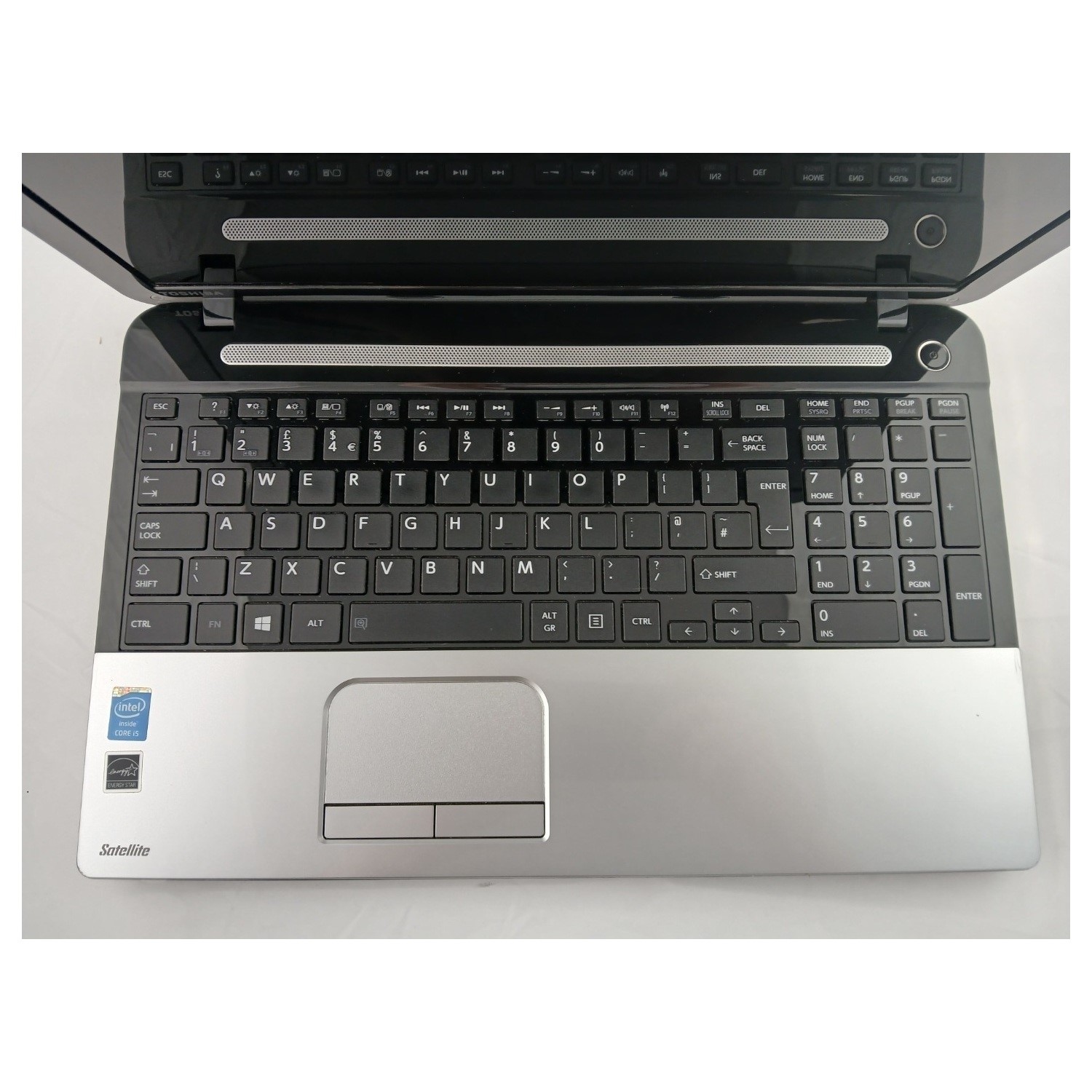
I got it from a Black Friday sale at Best Buy: a Toshiba Satellite C55. It was intended as a Christmas gift, so I got to play with it for one day and then had to hand it back. I officially received it on Christmas morning.
Being a kid on Christmas break was really something. We were off from school, but our parents still had to work, which meant there was an entire day, every day, with nothing to do but whatever I wanted. I'd get on the laptop and mess around. I'd already been using computers for years at that point, so gaming didn't really interest me — the laptop couldn't really compete with a desktop for that anyway.
What I was actually interested in was the hardware. A laptop is fundamentally different from a desktop; basically all of its components are strictly inferior to any desktop I'd had access to. I think the Toshiba might have had a third-gen Core i3, or maybe a Celeron — I can't really remember. It came with Windows 8.
But what really caught my eye was the Wi-Fi.
The Neighbor's Network
We had Wi-Fi at home, and it was pretty fast. But there was another SSID showing up in my network list that actually had a stronger signal than our own access point. It had to be my neighbor's network.
That might sound strange — how could a neighbor's Wi-Fi be stronger than the one in my own house? But given the layout of our house, with my parents' office and my bedroom positioned a certain way, it actually made sense.
I'd always been curious about connecting to that other network, except I didn't have the password. Being a teenager on winter break, I had plenty of time to research and experiment. I eventually figured out that the neighbor's network was using WEP encryption, which had already been known to be vulnerable for some time.
Anything you'd set up today — or even back in 2014 — would default to WPA2-PSK. But there it was: my neighbor's Wi-Fi, still on WEP.
I want to be clear: you should never do this today because it's unethical and illegal. But at the time, I set myself on a mission to crack the password.
WEP and Why It's Broken
Let me back up and explain WEP a bit. It had been known as early as 2001 that WEP was fundamentally insecure. A couple of years later, researchers devised a practical attack that specifically targeted WEP's weaknesses and produced an algorithm for cracking the key.
The core problem involves a component of every WEP packet called the IV, or Initialization Vector. The IV was transmitted in plaintext — unencrypted. This value was combined with the master key to generate a per-packet encryption key. One key part of the vulnerability is that IVs could be reused, which opens the door to replay attacks.
I'll be upfront: cryptography is not my area of expertise — just one semester of it. So I'm sharing my understanding of how this worked at the time, not guaranteeing perfect accuracy.
The first practical crack is called the PTW attack, and it works by targeting a specific subset of packets: ARP packets. ARP, or Address Resolution Protocol, is a lower-level protocol that devices on a network use to discover other devices, their MAC addresses, and their IP addresses. It's separate from regular internet traffic.
Aircrack-NG would try the PTW attack first, using only ARP packets. The reason ARP packets are so useful is that you know a lot about their structure ahead of time — their length and certain fields that don't change. If you can capture an ARP request and its response, you can predict that only a handful of bytes will differ between them, which lets you work backwards toward the key. It's a bit like how the Enigma cipher was broken: the codebreakers knew that weather reports always started with the same phrases, and that known plaintext gave them leverage.
If PTW failed, Aircrack-NG would fall back to FMS (Fluhrer, Mantin, and Shamir), a statistical attack with some brute-force elements. FMS requires more packets than PTW but can sometimes recover the key when PTW can't. The last resort is a dictionary attack — guessing the key from a wordlist — which in this case was not effective.
First Attempt: Windows
My first instinct was to find something that would work on Windows. The Toshiba Satellite had a Qualcomm Atheros AR956X wireless chip, and I spent some time researching whether it could support this kind of attack. The minimum requirement is monitor mode: the ability to capture packets from an access point without being actively connected to it. From what I could tell, the AR956X should have supported monitor mode.
I tried Aircrack-NG on Windows. It was a dead end. The Windows driver almost certainly didn't support putting the chip into monitor mode, and even if it had, it probably wouldn't have supported packet injection either.
Switching to BackTrack Linux
So I pivoted to Linux. I'd already dabbled with Ubuntu by that point, so I knew I'd need to pick a distribution and dual-boot it. I'd learned about BackTrack Linux — a distribution designed for what they called "auditing," which is basically a polite word for hacking. If you haven't heard of BackTrack today, you may have heard of Kali Linux, which is either its spiritual successor or a direct continuation of the project from the same team.
BackTrack came pre-installed with essentially everything you could need. It even had a desktop environment where applications were organized by type of security testing. Aircrack-NG was right there. I don't think it had a graphical interface specifically for Aircrack — just the command line — but I knew my way around a terminal well enough.
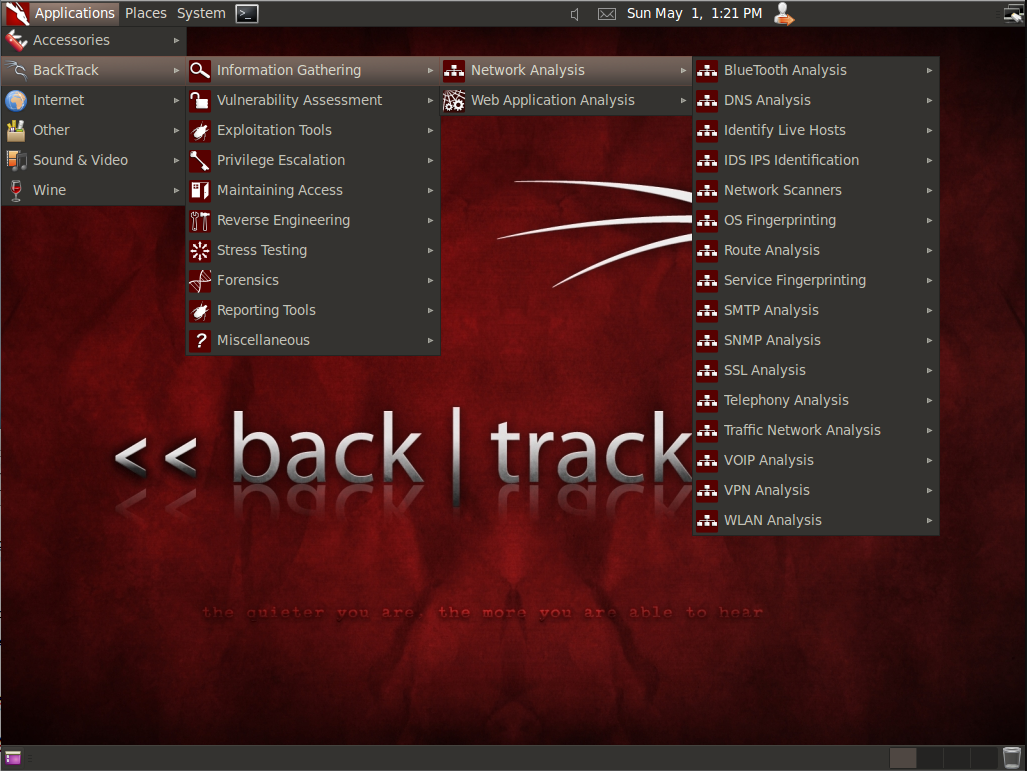
BackTrack 5, dual-booted on the Toshiba. This got me past the monitor mode issue, and I was able to capture packets from my neighbor's network.
But I still couldn't crack it.
Here's how the attack works: you run airodump-ng for some period of time to capture encrypted packets, then point Aircrack-NG at the resulting capture file and let it compute the key.
The problem was that even with BackTrack and the Linux driver, I couldn't capture enough packets to get a successful crack. And packet injection — replaying captured ARP packets to generate more traffic — wasn't working either. I wasn't sure if injection was disabled on the chip because it was a laptop chip, or if the transmit power just wasn't high enough to reach the clients on the network.
That was the blocker. I didn't have the right hardware.
Getting Better Hardware
Christmas money came to the rescue. I'd gotten about $200 in cash — a lot of money as a teenager with basically no income.
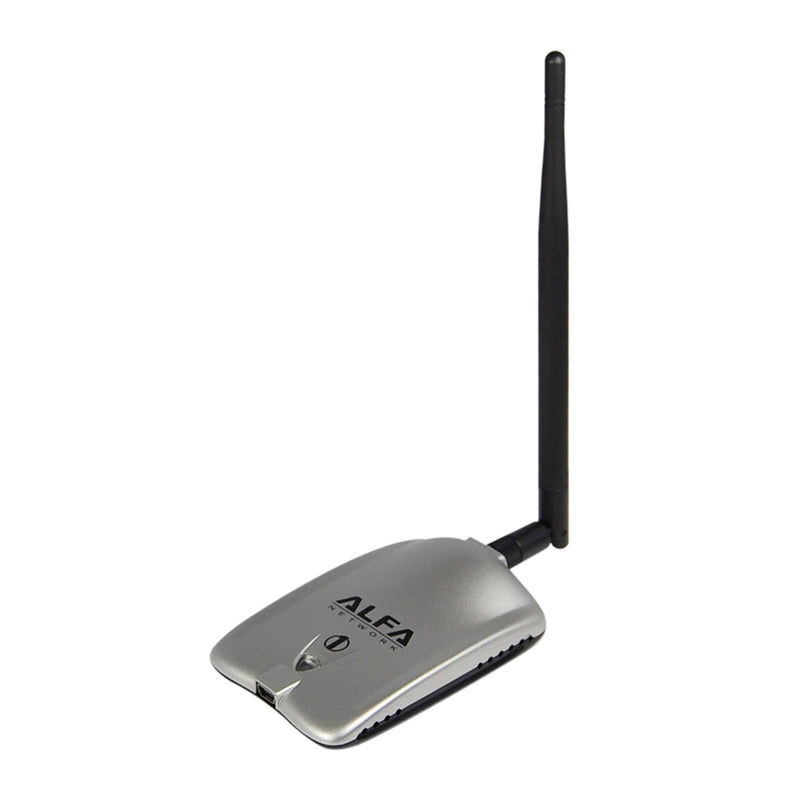
I had learned about a specific USB Wi-Fi adapter: the Alfa AWUS036H. It was about the size of a Motorola Razr, with a modest black plastic dipole antenna. The chip inside — the RTL8187 — is pretty well known in cybersecurity circles. Not only does it support monitor mode, it also supports packet injection and has significantly better output power than a typical laptop radio.
Not having a credit card, I worked out a deal with my uncle when I saw him at New Year's: I'd hand him $40 in cash and he'd order the adapter online for me. Done.
Spring Break: Warbiking
School resumed and kept me busy, but eventually spring break arrived. I had the Alfa AWUS036H with its external antenna plugged into my Toshiba Satellite running BackTrack Linux — a pretty solid setup for a teenager.
One quirk of running Linux on a laptop: when you close the lid, the machine sometimes doesn't actually go to sleep. Normally that's annoying. In this case, it was perfect. I could close the laptop, put it in my backpack, run the Wi-Fi adapter's antenna out through a gap, and zip it up. The adapter came with a mounting bracket — one attachment was a suction cup, the other was a clip — which let me attach it to the outside of my backpack.
The neighborhood was just two cul-de-sacs. A short distance from the end of the driveway put me essentially right in front of my bedroom and a little bit closer to my neighbor's house.
The Deauth Attack
The RTL8187's higher output power and better antenna gave me significantly more captured packets, and — crucially — the ability to inject packets that would actually reach the clients on the network.
Packet injection matters because it lets you speed up what is normally a slow, passive attack. The specific technique is a deauthentication (deauth) attack: you forge a packet that looks like it came from the access point, telling all the clients "we've lost contact — please re-authenticate." Spam this repeatedly, and all the clients start re-authenticating, generating a burst of ARP traffic you can capture.
So, standing out front of my house at the edge of the driveway closest to my neighbor's — laptop on the handlebars, wireless adapter clipped to my backpack — I ran airodump-ng to capture packets, sent the deauth attack, and then ran Aircrack-NG with the PTW attack.
I had the key in about 58 seconds.
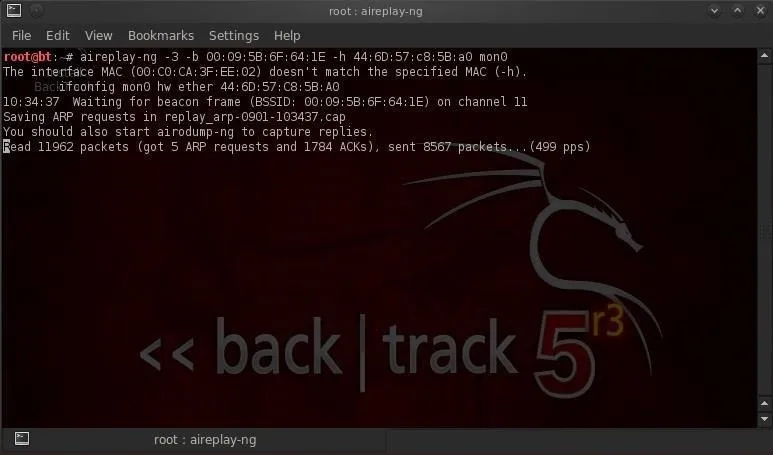
When it showed up, I almost didn't believe it. It was just a random string of letters and numbers — not something that looked like anything a person would deliberately choose as a Wi-Fi password. But the proof was in connecting: I entered that random string in Windows' Wi-Fi dialog, and I was on the internet.
It looked like the router had shipped with a randomly generated default key, and my neighbor had never changed it.
Going Deeper
One victory wasn't enough. I opened a browser, typed in 192.168.1.1, and got to the router's admin panel, protected with a username and password. Given that the Wi-Fi key looked like a factory default, I figured the admin credentials might be defaults too. A quick search for the router model's default credentials turned up a short list of username/password combinations to try.
It was almost unbelievably easy to get in.
Why Router Admin Access Is a Serious Problem
Knowing the WEP key is one thing. It lets you snoop on traffic from other devices on the network, potentially capture cleartext credentials or other sensitive data, and reach local services — IP cameras, printers, NAS devices — that aren't accessible from the internet because they're behind NAT. You're acting as a local client.
But admin panel access is an entirely different situation. From there, you could upload custom firmware and gain a root shell, giving you persistent access to the network even if every computer on it is replaced or every operating system is reinstalled. The router itself is often the last thing someone thinks about when they suspect they've been compromised — and yet the router is always online, always connected directly to the internet, making it an ideal target for botnets and a useful platform for DDoS attacks. Unauthorized router admin access is a substantially more serious problem than just being on the network.
The Actual Outcome
That's about where the story ends. The conclusion is not particularly interesting — it's the journey that matters.
Yes, I got the password. I never told my neighbor. Was the neighbor's network actually useful to me? No — even though the signal strength was better, their internet connection was clearly on slower broadband. And that turned out to be another lesson: better signal strength doesn't mean better internet speed. I was better off on my own network with the weaker signal than on theirs with the stronger one.
That adapter was pretty much only ever used that one time.
Lessons Learned
Never assume an encryption scheme is fully secure. WEP had been known to be broken for nearly a decade before I did this. Even the things we consider secure today will eventually become insecure — whether through increases in classical computing power, new research, or post-quantum threats.
Encryption schemes and keys should be chosen thoughtfully and re-evaluated periodically. Keys should be rotated, because someone could be capturing packets today with plans to crack them years in the future once new hardware or new attacks make it feasible. The same principle applies to account passwords, SSH keys, and cloud provider credentials. Everything should use the best available algorithm and be rotated on a regular schedule — annually, every six months, however often the situation demands. At one place I worked, certain credentials were rotated daily, or immediately after any human operator retrieval from the vault, for any reason.
Defense in depth. You can't rely entirely on the assumption that an attacker doesn't have the network key, because they might get it. And if the router admin panel is also protected by default credentials on top of that, you've compounded the problem unnecessarily — and avoidably.
Always change default credentials. Never assume something is secure out of the box. It's less common today, but manufacturers used to assume users would change the defaults when they set up the device. They really didn't.
Image sources